How to take a blood pressure reading
Learn how to take a blood pressure reading using your Sutter Sync monitor.
Before you take your first reading, make sure you've paired your Sutter Sync monitor with the
MyHealth Online app.
If you need help pairing, take a look at the guide that came with your care kit.
To get the most accurate reading of your resting blood pressure, avoid coffee, nicotine,
and high-energy activity for at least thirty minutes beforehand, and if you can, rest
quietly for five to ten minutes.
Now let's get started.
Grab your SutterSync blood pressure monitor and smartphone and sit comfortably at a table.
Make sure your phone's Bluetooth is turned on and then log into your MyHealth Online app.
You'll need the app open in the background during every reading.
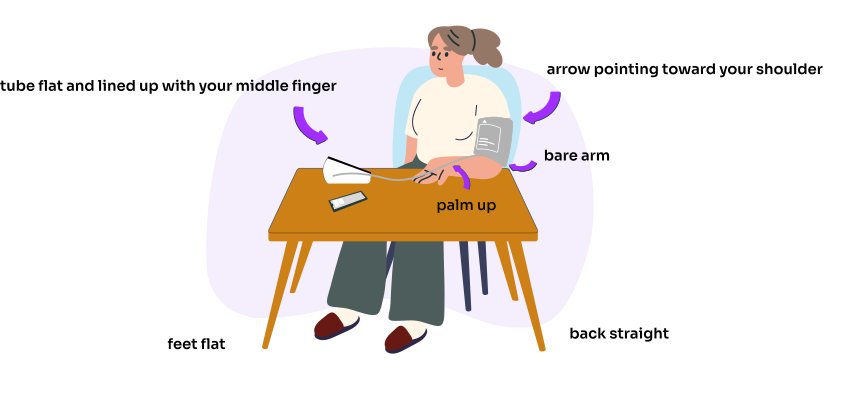
Remove any jewelry and roll up your sleeve so your arm is bare.
If possible, use the same arm for every reading.
Then wrap the cuff around your upper arm.
Wrap it about one inch or two finger widths above where your elbow bends.
It should feel snug but not too tight.
You should be able to fit one finger under the cuff.
Make sure the air tube runs down the center of your arm right in line with your middle finger
and rest your arm on the table with your palm facing up.
Sit up straight with your feet flat on the floor.
Be sure not to cross your legs.
Relax your shoulders and arms and take a few deep breaths.
Before you start, check that the monitor is set to user one.
It must stay on user one for every reading.
Then when you're ready, press the Start/Stop button to begin the reading.
The cuff will automatically begin inflating.
Be sure to stay still and quiet during the reading.
When your reading is finished, the cuff will deflate automatically, and you'll see your
numbers on the screen, along with a small upload icon that will blink and then disappear
once your reading has been securely sent to your MyHealth Online chart.
And that's it. The monitor will shut off automatically after
about a minute. To view your reading in the MHO app, tap the
menu icon and search Track My Health.
Under Health Logs, tap Hypertension Home Monitoring, then tap View All Readings to see
your most recent results.
If you run into any error messages while taking a reading, check out the user manual
that came in your care kit.
And if your cuff is too big or too small for your arm, contact your Sutter Sync care team
for support.